Below are step by step instructions for setting up SSH access to an CodeCommit git repository
Create SSH key
First create a key via ssh-keygen
cd ~/.ssh
ssh-keygen -f codecommit -t rsa -b 4096
You will be asked for passphrase I’ve had issues with using one with VSCode / Remote WSL so suggest not using one.
A typical output will look like below:
$ ssh-keygen -f codecommit_rsa -t rsa -b 4096
Generating public/private rsa key pair.
Enter passphrase (empty for no passphrase):
Enter same passphrase again:
Your identification has been saved in codecommit.
Your public key has been saved in codecommit.pub.
The key fingerprint is:
SHA256:1nDTaZZ7vUjfYjxcSwW+OEEpCGUrhcJ8HgShPd+iv+Y stephen@navi
The key's randomart image is:
+---[RSA 4096]----+
|   oo+o++.  ...  |
|   o+ +o...o.+ . |
|  . o+..o o.B . .|
|     o.o + + + o.|
|      o S . +.o.o|
|     . o    .=+.+|
|    .        .*+.|
|     ..      . o |
|     oE.         |
+----[SHA256]-----+
CodeCommit Configuration
Now log into the AWS Console navigate to the IAM service and select the User you wish to add the ssh key to.
Choose the Security Credentials tab, scroll down and select Upload SSH public key
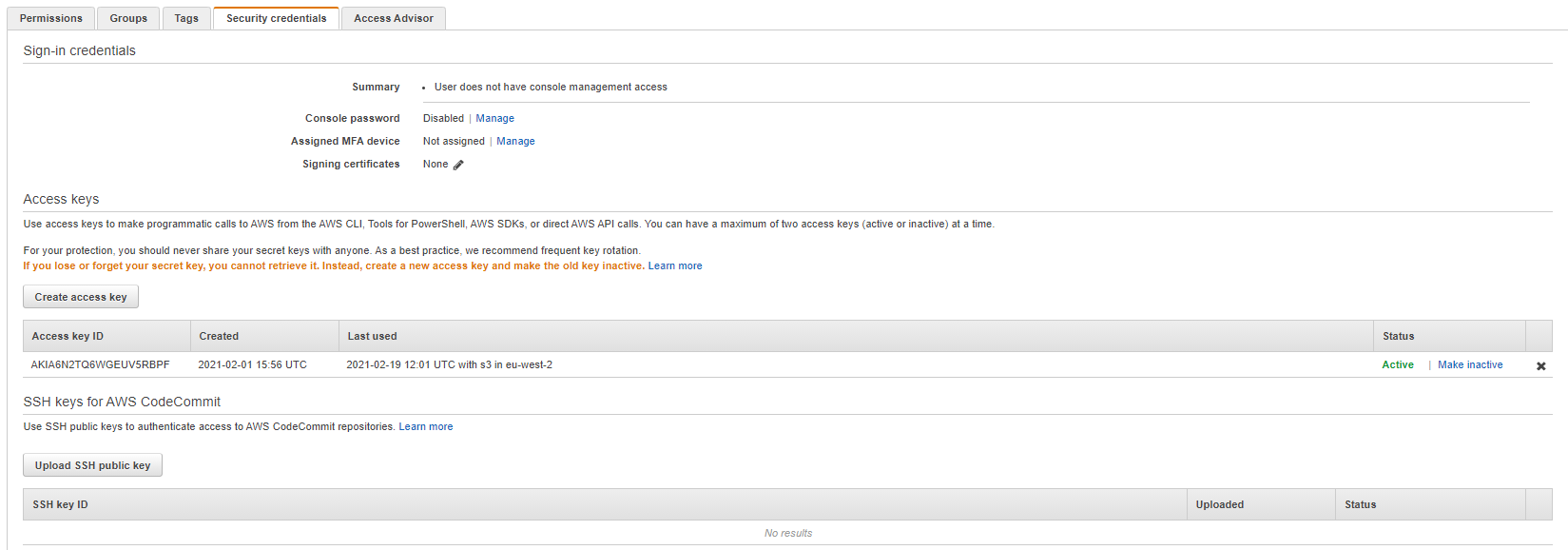 Copy and Paste your new public
 ssh key into the console:
cat ~/.ssh/codecommit.pub
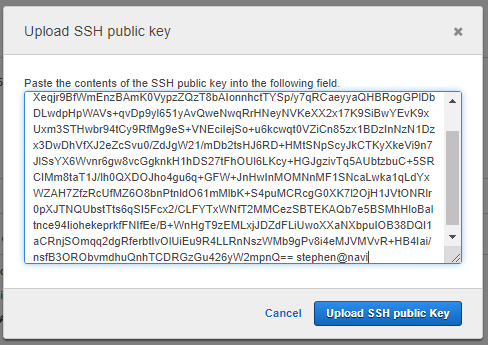 This generates an
 SSH key ID note this down!

Configure SSH
Next you need to configure SSH via the ~/.ssh/config, to use the new ssh key for your repos. If the file doesn’t exist, create it via touch ~/.ssh/config. You will need create / update it like below
Note to update the User key with the one genereated above
Host git-codecommit.*.amazonaws.com
  User APKA6N2TQ6WGE2NZ6M4O
  IdentityFile ~/.ssh/codecommit
Test SSH
Now test your connection:
ssh git-codecommit.us-east-2.amazonaws.com
This should output something like below:
You have successfully authenticated over SSH. You can use Git to interact with AWS CodeCommit. Interactive shells are not supported.Connection to git-codecommit.us-east-2.amazonaws.com closed by remote host.
Connection to git-codecommit.us-east-2.amazonaws.com closed.
If you don’t get this message, check your config or look at the resources section below for more troubleshooting steps.
Connect to CodeCommit Repo
Your now ready to connect to a repos from CodeCommit
Then run the clone command
$ git clone ssh://git-codecommit.eu-west-2.amazonaws.com/v1/repos/kubernetes
Cloning into 'kubernetes'...
The authenticity of host 'git-codecommit.eu-west-2.amazonaws.com (52.94.48.161)' can't be established.
RSA key fingerprint is SHA256:r0Rwz5k/IHp/QyrRnfiM9j02D5UEqMbtFNTuDG2hNbs.
Are you sure you want to continue connecting (yes/no)? yes
Warning: Permanently added 'git-codecommit.eu-west-2.amazonaws.com,52.94.48.161' (RSA) to the list of known hosts.
warning: You appear to have cloned an empty repository.