Below is a collection of examples of how to archive different tasks using Terraform
Remove a specific resource from an environment
Example scenario you created an ECR but no longer need it as the project has failed or its been moved to a different location. Either way. You have something in Terraform and you no longer want it there!
First get the name of the resource you want to delete. To get the name of the resource use:
terraform state list
I got the below output:
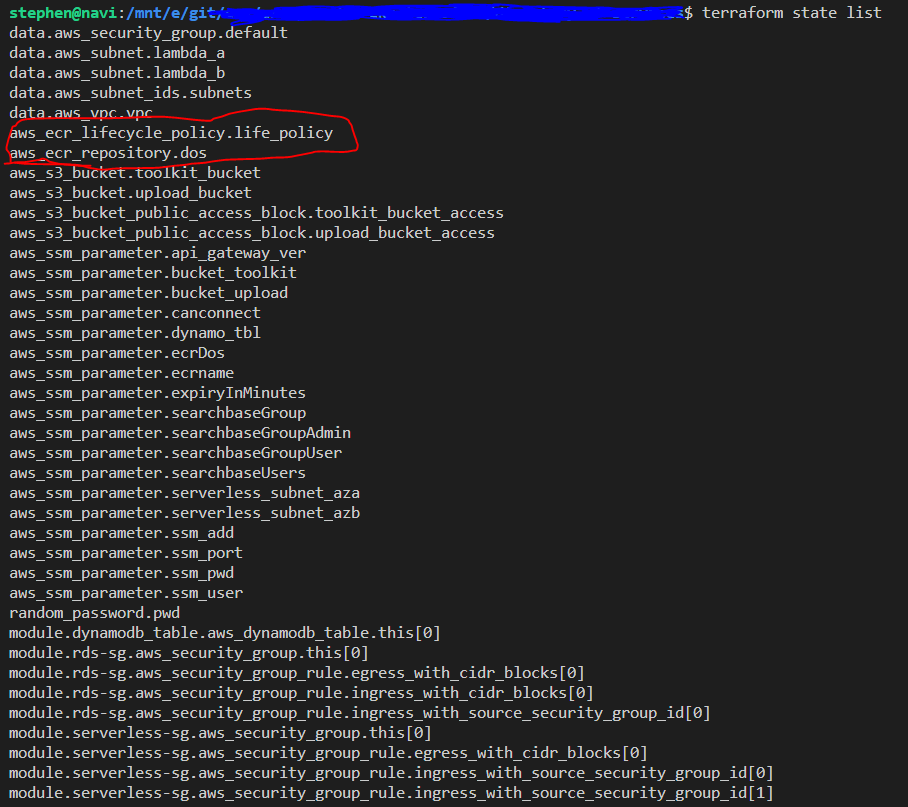
The output shows me 2 ECR resources (The policy and the ECR)
First lets delete the policy:
terraform destroy -target=aws_ecr_lifecycle_policy.life_policy
Then lets delete the ECR
terraform destroy -target=aws_ecr_repository.dos
you can now remove the file from your workspace and job done :)
Remove an object from Terraform State
In this example someone has kindly destroyed the object in the aws console and you now need to remove the resource from the terraform statefile
Again use state list to get the resource name:
terraform state list
Now we run state rm
terraform rm `module.foo`